Joomla Module Management & Assignments
Modules make up areas of your Joomla website and contain components such as menus, logins, banner ads etc.
To edit, make and assign which pages you wish the modules to appear on you need to have back end access to your Joomla website.
Which elements are modules ?
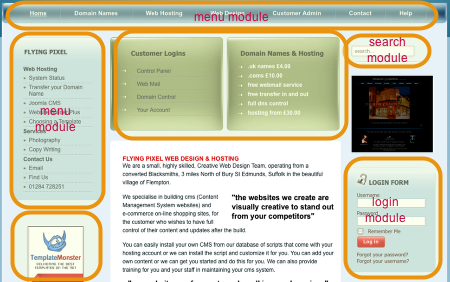
All the outlined areas are modules
Menu Assignment - on all pages
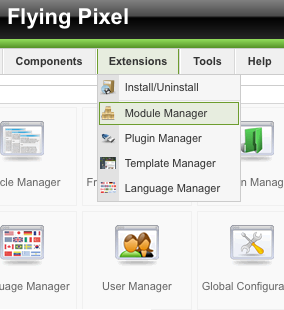
The main menu for this website needs to be available at all times...to do this
Login to the backend of your Joomla installation and select Extensions > Module Manager
Find the Module you want to assign
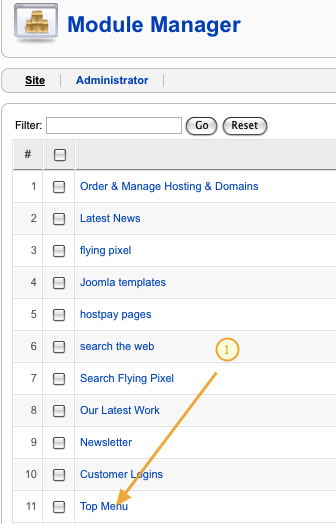
1) Click on the module you want to work with...in this case... Top Menu
Top Menu assignment
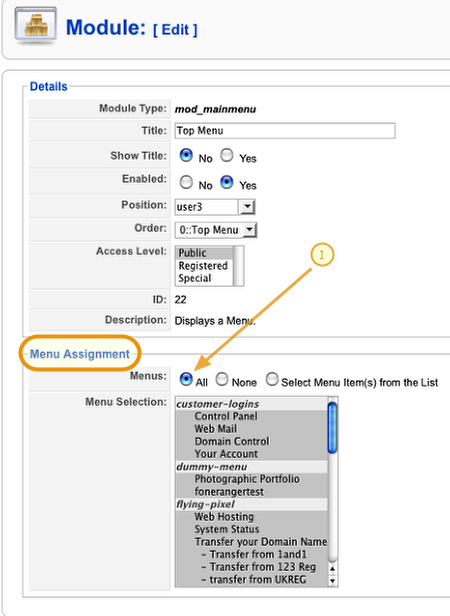
1) We want the menu module to be available on all the pages...select the all radio button...then saved your settings.
Module assignment - on selected pages
We want to the login module to appear on the home page and the contact page only.
To do this click on the Login Form module.
Assigning the Login to just 2 pages
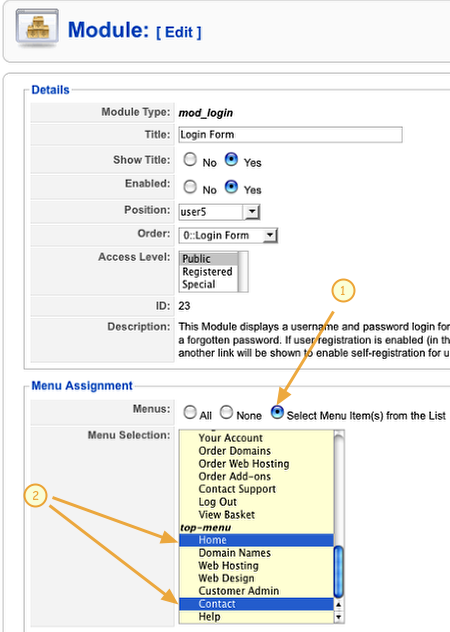
1) From the Menu Assignment section select the Select Menu Items radio button
2) Select the 'Home' and 'Contact' pages from the top menu.
To make non-continuous select of items
- windows = ctrl+click
- mac = cmd+click
Be Warned - if you are making changes to a menu that already appears on varying pages, be careful to ctrl+click(win), cmd+click (mac), to add or remove a selected page from the settings. If you just click you will loose the currently selected pages.
Trouble Shooting & Advanced Tips
How do I assign module to appear or not appear on Virtuemart and other component pages?
Sometimes the standard Joomla module manager does not enable you to control your modules as you need. In this case we recommend the Advanced Module Manger from NoNumbers
There is a Free version which adds a great deal more functionality and a paid for version is just about essential if you are using Virtuemart or the Zoo component.